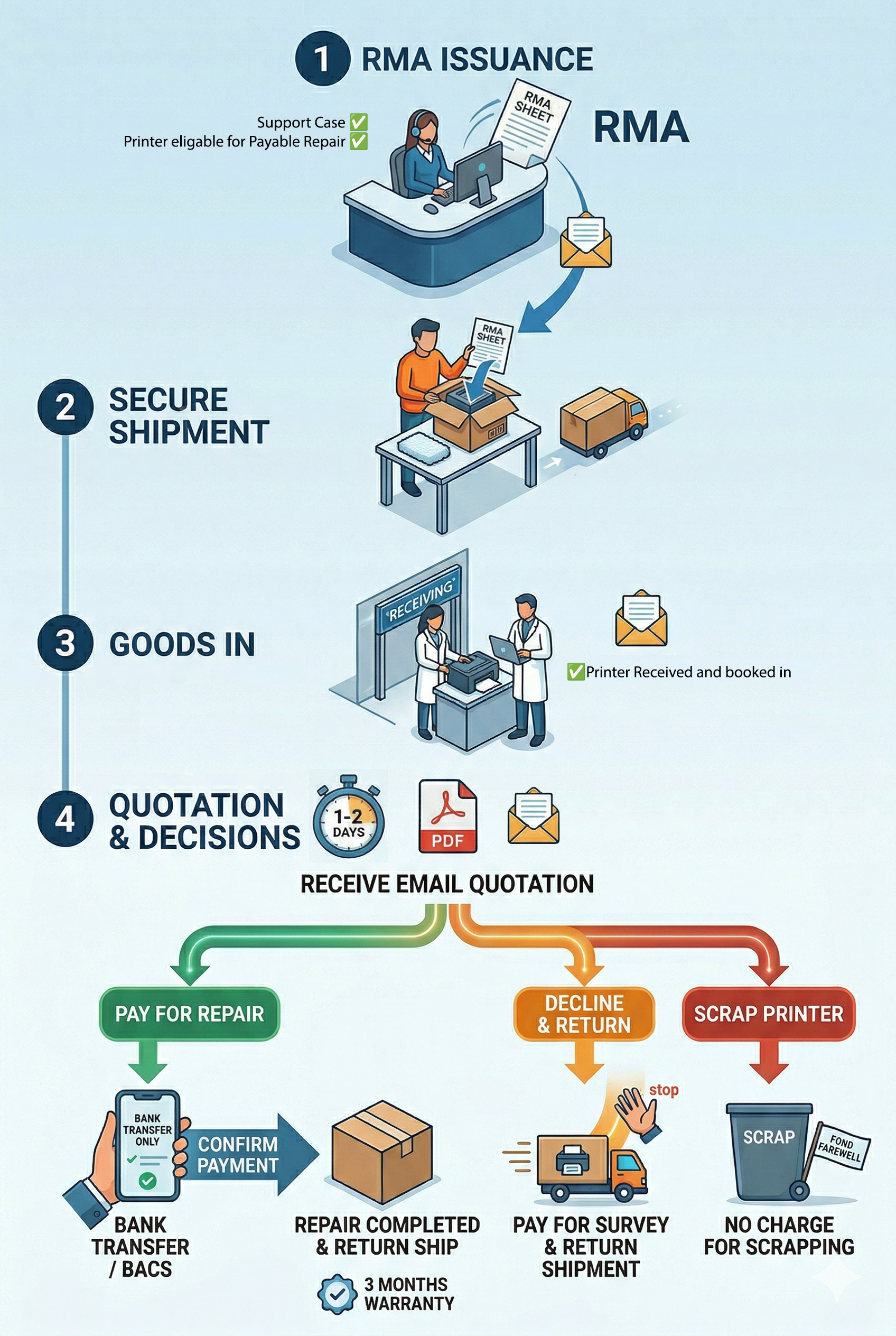
At this point your Out Of Warranty Repair Process will be as follows:
From your Support Case Magicard will issue you an RMA. (Return to Manufacturer Authorisation)
Print the RMA sheet and include it in with your securely packaged printer then arrange your shipment to Magicard (info and address will be on the RMA)
When your printer arrives we will notify you by email and your printer will be Surveyed, typically within 1 to 2 days of arrival.
After the Survey you will receive an email Quotation for the cost of any remedial work (inc return shipping).
You then have 3 options:
Pay for the repair
Payment information will be provided upon the Quotation PDF.
Currently we only accept Bank Transfer (usually instant) / BACS (can take 3 days).
When payment is confirmed we will complete the repair and return ship your printer.
Any work done is warranted for 3 months.
Decline the quotation and have the printer shipped back
You are under no obligation to go ahead with the repair and if you wish to decline your quotation we can simply ship your printer back to you. The cost of this will also be provided within your quotation.
Scrap the printer
Sadly in some cases our beloved printers may be simply beyond economical repair.
We will not charge for scrapping a printer and will give each one a fond farewell.